Ok, it's been a while, but I am ready to begin the blog series on integrating SSRS 2008 R2 and SharePoint Foundation Server 2010. I'll try to get the entries out on a weekly basis, but in the meantime, if there is anything in particular that anyone would like to see an example of, or if there is anything that you have questions on, let me know and I'll put up some one off posts to answer any questions that you may have with your SSRS / SPS integration or project.
Tim
Tuesday, December 6, 2011

Tuesday, May 24, 2011
TechEd North America 2011
TechEd this year was great! The sessions that I attended were all very worthwhile. The ones that I missed, I'll catch on Channel 9. I was able to volunteer for a few things this year as well. Volunteering at the event is definitely worthwhile because you can help out, and it puts you in a position to network with many more people outside of your normal track at the conference.
One of my very good friends, Adam Tuliper, presented this year at TechEd. He did a great job, and his presentation is one that every developer should view and learn from. It covered a topic that most developers (and sadly, me too) overlook or put off until the "functionality" of the project is completed. The presentation is on "hack proofing" your ASP.NET web forms and MVC websites. You can watch the recording here: http://channel9.msdn.com/Events/TechEd/NorthAmerica/2011/DEV333. Like I said, you definitely will learn a lot about security.
If you get the chance to see Adam present at a CodeCamp or User Group in your area, it is definitely worth the price of admission. :)
Tim
One of my very good friends, Adam Tuliper, presented this year at TechEd. He did a great job, and his presentation is one that every developer should view and learn from. It covered a topic that most developers (and sadly, me too) overlook or put off until the "functionality" of the project is completed. The presentation is on "hack proofing" your ASP.NET web forms and MVC websites. You can watch the recording here: http://channel9.msdn.com/Events/TechEd/NorthAmerica/2011/DEV333. Like I said, you definitely will learn a lot about security.
If you get the chance to see Adam present at a CodeCamp or User Group in your area, it is definitely worth the price of admission. :)
Tim
Isolated Storage development in Windows Phone
Tonight I was racking my brain trying to get a json serialized file from the isolated storage of the emulator while I was debugging. This tool is a god send and will help you to inspect the files that you create in the isolated storage of your development environment, it is named: Windows Phone 7 Isolated Storage Explorer. It can be found here: http://wp7explorer.codeplex.com/. There were a few quirky things, but it did exactly what I needed which was to let me inspect the files that I put into the isolated storage area. I hope this post helps someone save some time.
For those that are interested...
I retrieved several DataServiceCollections from an odata feed, converted them to an ObservableCollection and then serialized it out to the Isolated Storage using the
DataContractJsonSerializer and the IsolatedStorageFileStream. This was all so that I could include this data with my application as a resource. This was necessary since the odata service is not guaranteed to stay up much longer, and the data is not going to change.
But, with the help of the WP7Explorer, I was able to get the json serialized files and now I can include them with my application, and within the App.xaml I can put these files to the Isolated Storage the first time my application starts up.
Tim
For those that are interested...
I retrieved several DataServiceCollections from an odata feed, converted them to an ObservableCollection and then serialized it out to the Isolated Storage using the
DataContractJsonSerializer and the IsolatedStorageFileStream. This was all so that I could include this data with my application as a resource. This was necessary since the odata service is not guaranteed to stay up much longer, and the data is not going to change.
But, with the help of the WP7Explorer, I was able to get the json serialized files and now I can include them with my application, and within the App.xaml I can put these files to the Isolated Storage the first time my application starts up.
Tim
Thursday, April 21, 2011
Creating the Windows Phone app
Ok, with all of our tools installed, (and our phone unlocked - because we will run the app on the phone too) we can start to put together our app. Fire up Visual Studio 2010. Select File - New - Project. Then select the "Windows Phone Panorama Application" template. This template will give us a very nice base for our application.
 Let's give our app a nice and meaningful name, something like: MyPocketTechEd (since that is what we are creating: an app that puts all of the up to the minute TechEd data in our pocket.). Click Ok, and the shell of our app is created for us with the Panorama template. Ensure that you selected "Windows Phone Emulator" as the target and then click F5. will bring up the emulator, and you'll see the panels that are contained within the template. Our application should look like this for now:
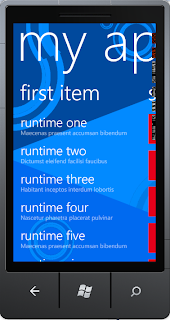
You can scroll down, scroll to the second set of items, etc. This is great, with very little effort on our part, we were able to create the basics for our app.
Coming next: Changing styles, images, and text. Then we'll be on to populating the app with data from the TechEd odata feeds. I'll update this post with this next part as soon as I can (hopefully withing the next few days.)
Tim


You can scroll down, scroll to the second set of items, etc. This is great, with very little effort on our part, we were able to create the basics for our app.
Coming next: Changing styles, images, and text. Then we'll be on to populating the app with data from the TechEd odata feeds. I'll update this post with this next part as soon as I can (hopefully withing the next few days.)
Tim
TechEd scheduler for Windows Phone and Silverlight - Part 1
Ok, even though I want to create a really nice app using the Portable Class Library, MVVM Light, and other tools to be able to have my app accessible from multiple places, we have to start somewhere...so, I am starting with a plain old WinPhone 7 app that directly consumes the TechEd odata feed. I'll then build this simple app out into something cooler in subsequent posts. But, for now, let's start with the WinPhone7 app, and put the TechEd schedule on our phone...instead of on our lanyard. :)
To get started on building the Windows Phone app to consume the TechEd North America 2011 odata feed, I installed the following:
To get started on building the Windows Phone app to consume the TechEd North America 2011 odata feed, I installed the following:
- You can use any version of Visual Studio that you prefer, but I have Visual Studio 2010 Professional with the .NET Framework 4.0.30319 SP1 installed. Here's a link to the express edition.
- Windows Phone Developer Tools
- Open Data Protocol .NET / SL / SP7 Libraries
- Silverlight 4 Tools for Visual Studio
- Silverlight Toolkit
- Creating the Windows Phone app
- Connecting to the odata feed to get our data for TechEd
- Putting it all together
- Creating a smart scheduler
- Adding in videos to our app
TechEd North America 2011
I will be at TechEd in Atlanta in May and am looking forward to meeting others that are interested in Windows Phone and XNA development. I really enjoy going to TechEd to learn from what others in the industry are doing and to get access to the product teams from Microsoft. My TechEd profile is public if you want to add me as a contact.

Wednesday, April 13, 2011
TechEd scheduler for Windows Phone and Silverlight
I just started working on an app to setup my schedule of events at TechEd. Instead of just creating a WinPhone app that calls into the TechEd odata feed directly and simply list out the speakers, events, sessions, etc. I am creating an app using MVVM Lite and the Portable Class Library so that I can make the app available on the phone and within a Silverlight app. The app will allow you to create your session schedule and, if time permits, I might add in some "social" aspects to the app as well to plan your "after session" fun.
Subscribe to:
Posts (Atom)